How text message opt-in works
Effective date: November 18, 2026
This page shows how people agree to get text messages from Text Lamb, with the exact messages we send. It’s public, and you don’t need an account to read it.
- Each person signs up and agrees to texts for themselves. No one can sign up someone else or agree for them.
- A person starts by texting Lamb first and replying YES, or on our sign-up form with an invite code.
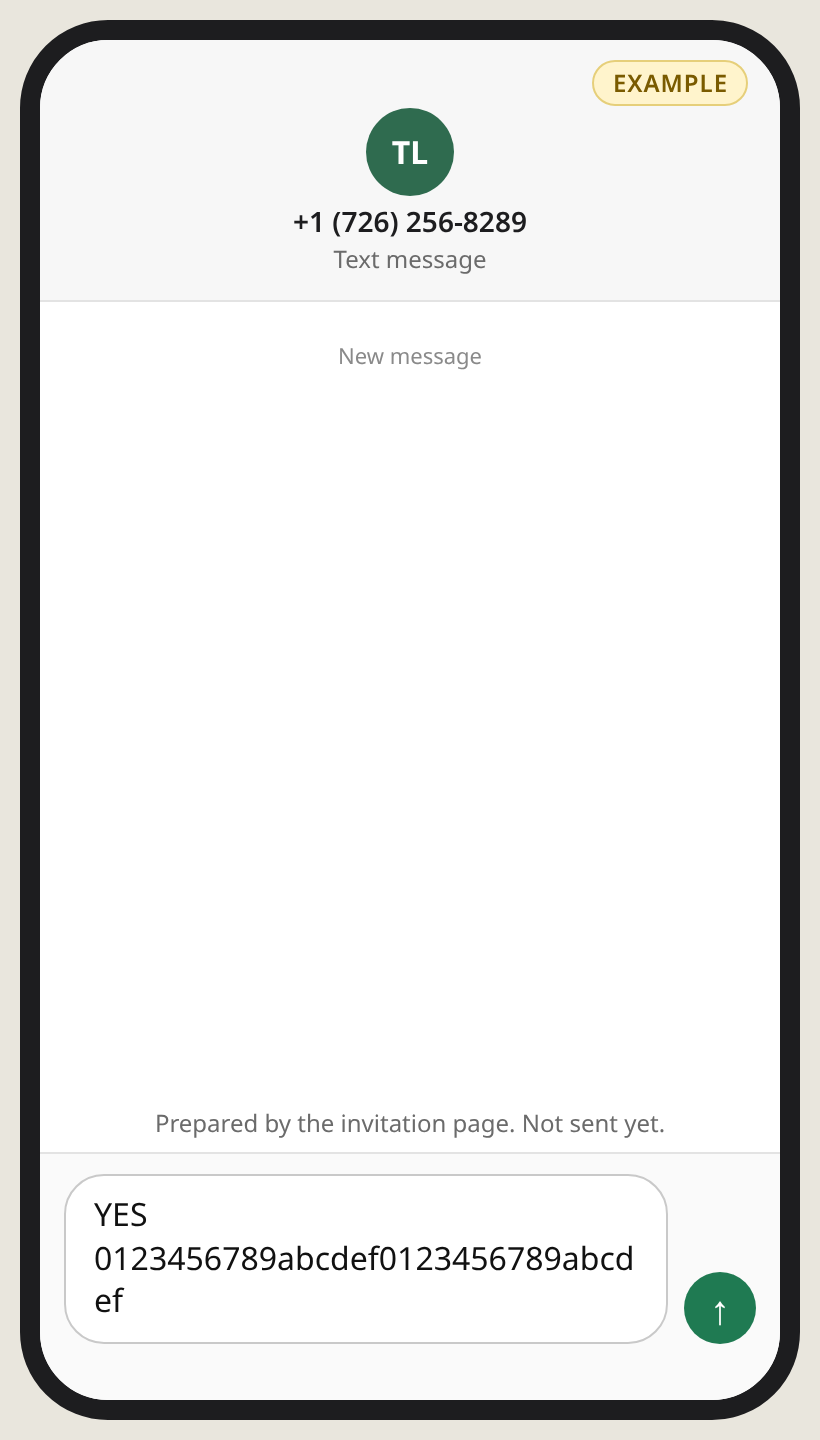
- Contacts the senior chooses receive a private invitation link and choose whether to opt in. To agree, they send the text prepared by the invitation page from their own phone.
- We never text a number first.
- We don’t buy or rent phone-number lists, and we don’t sell or share your number for marketing.
- Consent to receive Text Lamb Family Alerts is not a condition of any purchase.
- Message frequency varies. Message and data rates may apply. Reply STOP to opt out, HELP for help.
- The senior’s chat with Lamb and Text Lamb Family Alerts use one Text Lamb number. One STOP to that number stops everything Text Lamb sends to that phone.
How the senior opts in
The senior’s own program is called Text Lamb: recurring two-way text messages (SMS and MMS) with Lamb, an AI, through our messaging provider, Twilio, from the same Text Lamb number that sends family alerts. It covers answers to questions on any topic, scam checks on texts, emails and photos the senior sends, the daily check-in and the reminders (for anything they choose) that the senior sets up, and account notices about their own plan. Members can also ask Lamb for other recurring texts they choose, such as a morning weather update for their area; Lamb may suggest one once in their first week, it starts only when they ask or reply YES, and they can ask Lamb to turn it off anytime. No marketing. Each person signs up for themselves, in one of two ways.
Way 1. The person texts Lamb first
- They text (726) 256-8289 from their own phone, typing the number themselves. Friends they refer and people given a gift start the same way, with a code in that first text. A code only credits a referral or matches a gift. It is never consent.
- The button and its disclosure read, word for word:
Button:
Prepared text it opens (they press Send):
Disclosure under the button:
- Lamb replies once, word for word:
- Before YES, Lamb answers only HELP and STOP. Only the person’s own plain YES, from their own phone, signs them up. If sign-ups are paused, a person who texts gets one reply pointing to textlamb.com/quiz, at most once a week, and nothing else.
- After YES, Lamb sends one welcome, word for word:
Way 2. The sign-up form, with an invite code
- They open their invite link and sign up at app.textlamb.com/signup.
- They enter their own details.
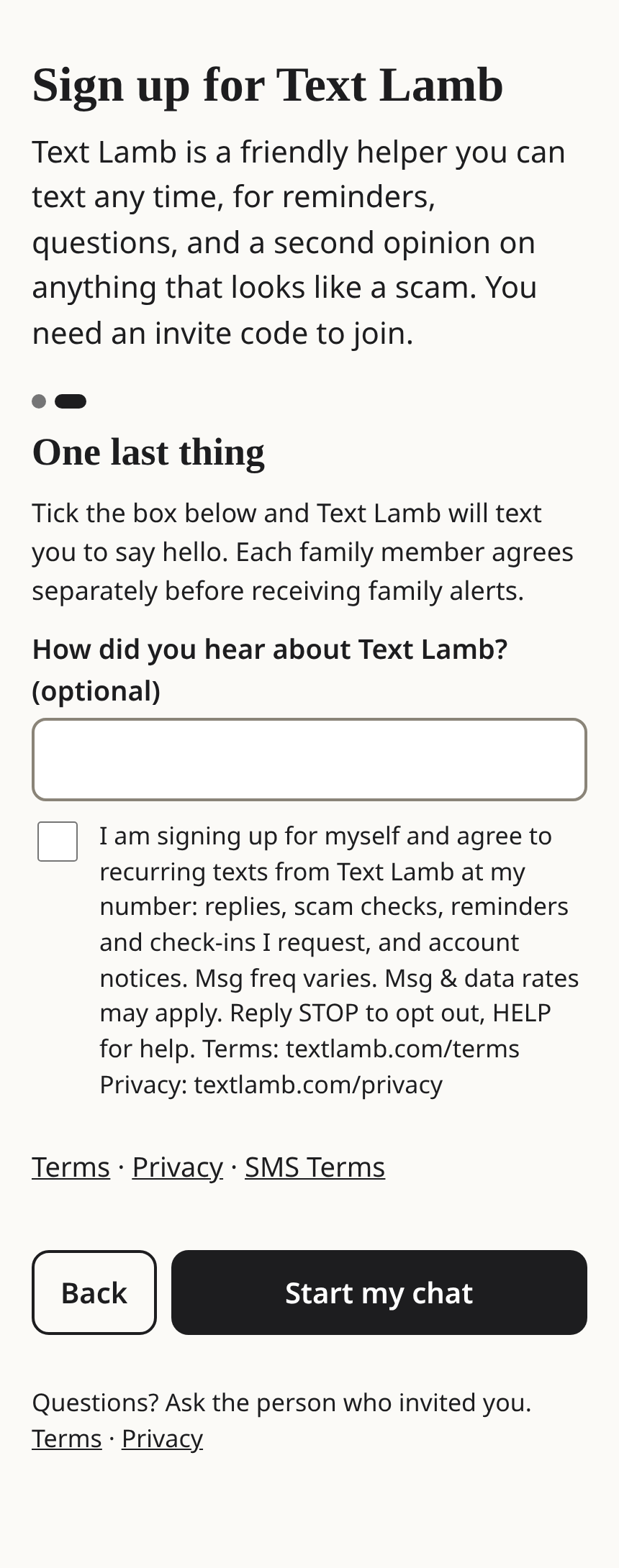
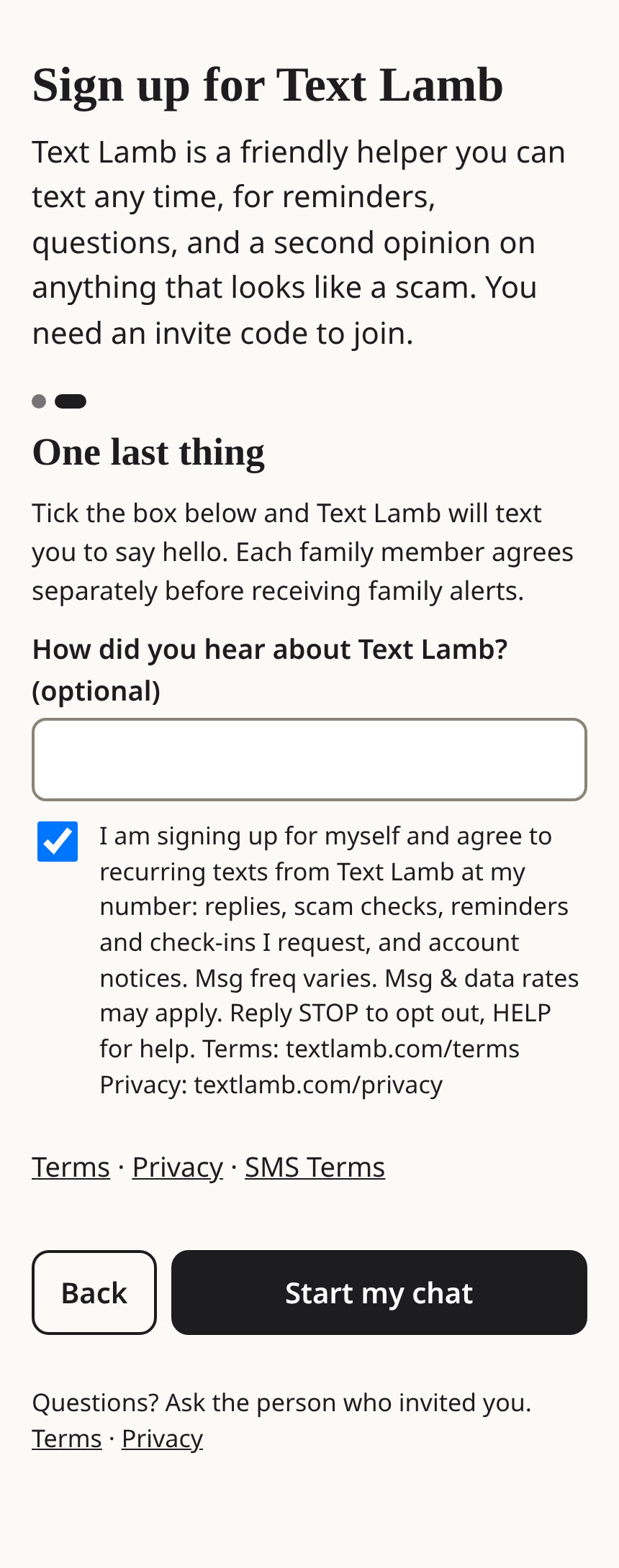
- They tick the SMS consent checkbox themselves. It starts unchecked. Ticking it means they agree to receive recurring text messages from Text Lamb at that number, for the purposes above. The form also tells them that message frequency varies, that message and data rates may apply, and that they can reply STOP to opt out or HELP for help, and links to our Terms and Privacy Policy.
A second person on the plan, such as a spouse, signs up the same way, on their own phone, and has their own private chat. Anyone can share Lamb’s number or the signup link, but they can’t sign the senior up or agree to texts for them. Lamb doesn’t text anyone until they have texted Lamb and replied YES, or signed up and agreed on the form.
Sample messages to the senior
Daily check-in (only if the senior asks for one):
Example only: an answer to a question:
Example only: a scam check, after Ruth sends Lamb a photo of a text Ruth got:
Reminder (only if the senior sets one up):
Example only: when the senior reaches the weekly limit:
Example only: a reminder before the free trial ends:
Example only: a reminder before a yearly plan renews:
Chat-sharing offer (to person using Lamb):
Sharing start notice (to person using Lamb):
SHARING OFF reply (to person using Lamb):
It stays on until you text SHARING OFF.
Who Text Lamb Family Alerts is for
Text Lamb is an AI text-message assistant for older adults (“the senior”). Jon Lamb Etc LLC (dba Text Lamb), 10212 Lost Bluff, San Antonio, TX 78240. If the senior turns them on, people the senior chooses (family, a friend, a neighbor or a caregiver) can get short texts from Text Lamb’s number, the same number the senior texts. Nothing goes to anyone by default. Each kind is separate and stays off until the senior turns it on from their own phone:
- Scam heads-up: when Lamb flags a likely scam, only that a message looked like a scam, never what it said. Never the message, links, numbers or amounts.
Family alerts are never marketing.
The examples below use Ruth (the senior) and Sarah (someone Ruth chooses: family, a friend, a neighbor or a caregiver). They are examples only.
Family alerts: step by step
Step 1. The senior asks Lamb to add a contact
In their own chat with Lamb, the senior asks Lamb to add a contact. Only the senior can do this. A contact can’t add themselves.
Example, in Ruth’s chat with Lamb:
Step 2. Lamb gives the senior a private invitation link
Lamb replies in Ruth’s own chat with a private invitation link for Sarah. Each invitation is for one person and has its own YES code. Lamb doesn’t send anything to Sarah.
Step 3. The senior shares the link personally
Ruth shares the link with Sarah personally, in person or in an email Ruth sends. Text Lamb doesn’t send invitations by email or text, and doesn’t ask for Sarah’s email address.
Step 4. The contact reads the disclosures
Sarah opens the link. The invitation page tells them which senior the alerts are about (Ruth), what the alerts are, that they are recurring text messages from Text Lamb’s number, that message frequency varies, that message and data rates may apply, that they can reply STOP to opt out or HELP for help, that consent isn’t a condition of any purchase, and that they must be 18 or older. It links to our Terms and Privacy Policy.
Step 5. The contact opts in from their own phone
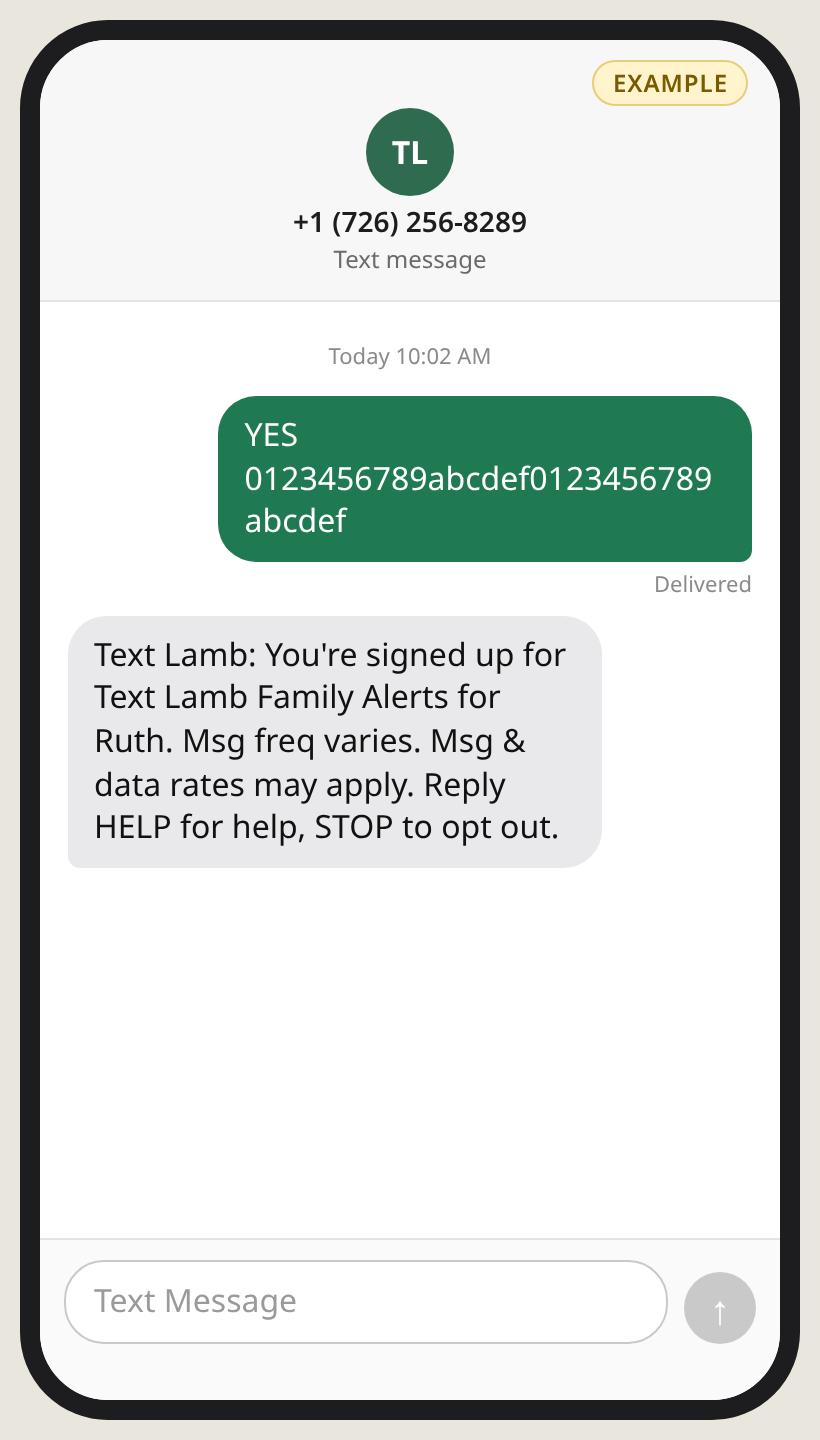
If Sarah wants the alerts, Sarah texts the YES code shown on the invitation page to Text Lamb’s number from their own phone. That text is their consent. Before it’s sent, Text Lamb sends Sarah nothing: no request and no reminder. If it’s never sent, Sarah never hears from us.
Step 6. After the YES code, we confirm
When Sarah texts the YES code, we record the time, the message and the invitation it came from, and send:
Step 7. Nothing is sent until the senior turns an alert on
Nothing is sent to Sarah until Ruth turns an alert on. Ruth asks Lamb (or Lamb mentions it once), Lamb texts Ruth exactly who gets it, what is shared and how to turn it off, and only Ruth’s plain YES turns it on.
Step 8. Either of them can stop it at any time
Ruth can turn any alert off at any time, for example by texting “family alerts off”, or ask Lamb to remove Sarah. Sarah can reply STOP at any time.
Sample family alerts
Every alert starts with “Text Lamb:”.
Scam heads-up (only if Ruth turned it on):
Weekly family update (to family member):
Monthly recap (to family member):
Sharing start notice (to family member):
Sharing stop notice (to family member):
HELP, STOP and START
Text Lamb’s number has one set of replies, for the senior and for contacts alike. One STOP stops everything Text Lamb sends to that phone, including the senior’s chat with Lamb and family alerts.
Reply HELP:
Reply STOP (or STOPALL, UNSUBSCRIBE, CANCEL, END or QUIT):
Reply START (or UNSTOP):
Frequency and cost
- Message frequency varies. The senior’s texts vary with how they use Lamb, including the check-ins and reminders they set up. Contacts hear from us only about the kinds of alerts the senior turned on: at most one scam heads-up a day. Scam heads-ups aren’t sent between 9 PM and 8 AM in the senior’s time zone or the contact’s.
- Message and data rates may apply. Text Lamb doesn’t charge for these messages.
- Carriers are not liable for delayed or undelivered messages.
You must be 18 or older to use Text Lamb or to be a family contact.
What the sign-up pages look like
Both sign-up pages below are private: the senior’s sign-up form needs an invite code, and each family invitation link is for one person. So that anyone can see them, here are screenshots of both, taken from a test invitation with example names (Ruth and Sarah) and a made-up phone number and code. No real person’s details are shown.
The senior’s sign-up form
The SMS consent checkbox on the form at app.textlamb.com/signup reads, word for word:
The family invitation page
The family invitation page shows this disclosure, word for word, above the YES code:
More information
- SMS Terms: textlamb.com/sms-terms
- Privacy Policy: textlamb.com/privacy
- Terms of Service: textlamb.com/terms
- Help: hello@textlamb.com
You can reach us at hello@textlamb.com.